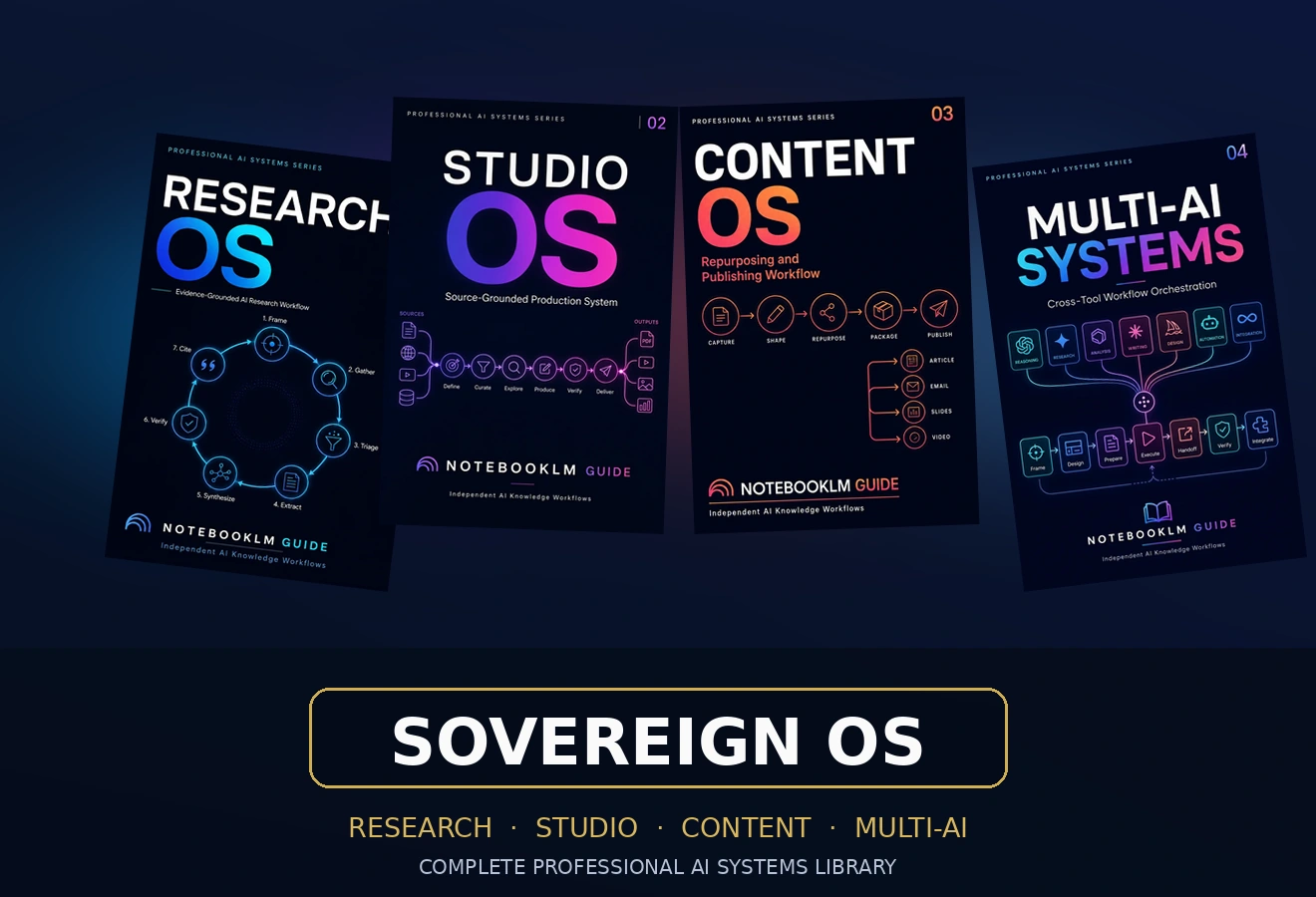
Build a reusable AI knowledge system with Sovereign OS—not another stack of disconnected chats.
Connect research, production, content, and multi-AI work without losing the evidence, context, standards, or decisions behind the result.
One-time payment · permanent digital access · no physical shipping · no recurring fee · updates through December 31, 2026 included
Sovereign OS is a connected professional reference library for research, production, content, and multi-AI coordination. It combines four complete systems with guided prompts, quality gates, handoffs, recovery, and reuse practices so projects can move between tools without losing evidence, context, standards, or decisions. Academic and licensure exam systems are separate products.
What Sovereign includes—and replaces
Buying Sovereign replaces the need to buy the four included Single OS products separately. It adds the operating layer that connects them, so research, production, publishing, and multi-AI work do not live in silos.
The Sovereign integration layer
Four systems separately cost $99.96. Sovereign is $69.99.
You save $29.97 — 30%. Across 1,084 guided prompts that works out to about 6.5¢ per prompt. The integration layer — the routing tree, cross-OS handoff protocol, verification rubric, and recovery map — is not sold separately at any price.
One-time payment · permanent digital access · no subscription · updates through December 31, 2026 included. 2026 pricing is now in effect.
Unlock Sovereign OS — $69.99 →AI makes output faster. It does not automatically make the work more durable.
A report can become a presentation, email, article, or video script in a day. Then the editorial work begins: terminology shifts, earlier decisions resurface, evidence disappears between tools, and an improvement in one place creates a contradiction somewhere else.
The final deliverable may survive while much of the intelligence behind it does not. Sovereign OS provides a stable reference layer beneath changing models and interfaces, so verified evidence, quality standards, important decisions, reusable structures, and lessons can strengthen the next project instead of remaining buried in old conversations.
Twenty sources. Several AI tools. One consequential deadline.
Suppose you need to turn 20 source documents into a decision-ready report and presentation within three days. Sovereign OS gives each stage a defined job and preserves what the next stage must receive.
Frame the decision, screen the sources, extract comparable evidence, identify disagreement, and build a traceable claim ledger.
Convert the evidence into a report and presentation using defined output requirements, source boundaries, and quality gates.
Adapt the core asset for other audiences and channels while preserving claims, terminology, and qualifications.
Route tasks, transfer approved context, challenge weak outputs, recover from failure, and integrate the result.
The result is more than a finished deliverable. The project leaves behind verified evidence, documented decisions, reusable structures, tested workflows, and a stronger starting point for the next assignment.
A real look inside the library
Major workflows specify the context, objective, operating task, expected artifact, quality check, and next handoff. The prompts support individual moves inside a larger governed process; they are not presented as a substitute for professional review.
Four included systems
PromptsFour complete professional reference systems, plus the Sovereign layer that routes work and preserves evidence, decisions, standards, and review requirements between them.
- Research OS — Evidence-grounded research architecture 274 PROMPTS
- VOL. 01 · 64 architecture prompts + 7 modules × 30 prompts — product overview, universal research architecture, and seven research application modules
- Studio OS — Production and professional output architecture 120 PROMPTS
- VOL. 02 · 120 prompts across 30 production workflows — universal production architecture, Studio Workbench, six workflow libraries, and reference toolkit
- Content OS — Knowledge-compounding content architecture 420 PROMPTS
- VOL. 03 · 14 modules × 30 prompts — foundation and grounding, production and multiplication, distribution, governance, and renewal
- Multi-AI Systems — Orchestration for knowledge work 270 PROMPTS
- VOL. 04 · 9 systems × 30 prompts — nine coordinated systems spanning Claude, Gemini, ChatGPT, Codex, Antigravity, and the AI Round Table
TL;DR — Choose one Single OS for one immediate bottleneck. Choose Sovereign when work must move across Research, Studio, Content, and Multi-AI without losing evidence, context, or constraints. The four included OS products do not need to be purchased separately.
Updated August 14, 2026. Maintained by a small team of AI super-users who teach multi-AI research and study workflows to researchers, students, and professionals — no affiliate relationships. About this guide → Changelog
The 6-Phase Workflow
Each phase has its own prompt library. Together they form a complete research-to-output pipeline.
Upload & Ground Your Sources
Prepare and ground the source set before analysis begins. Define the source boundary, identify gaps, and require citations so later claims remain traceable to the supplied material.
Research & Synthesize
Turn raw sources into structured knowledge. Literature reviews, cross-paper synthesis, methodology comparison, gap identification — all grounded in your uploaded evidence.
Deep Analysis & Critical Evaluation
Go beyond summaries. Evaluate methodology rigor, identify bias patterns, map theoretical frameworks, and generate original hypotheses from your source base.
Create Studio Outputs
Turn approved source material into slides, audio, mind maps, infographics, quizzes, and other deliverables while preserving the evidence boundary and applying output-specific quality checks.
Multi-AI Orchestration
NotebookLM grounds it. Claude structures it. ChatGPT writes it. Gemini verifies it. The Sovereign OS shows you exactly how to chain 4 AI tools into one workflow where each does what it does best.
Content & Distribution
Turn one research notebook into a newsletter, a YouTube script, 10 social posts, an SEO article, and a podcast episode — all grounded in the same source base, all on-brand.
Free guidance, a Single OS, or Sovereign OS?
| Free guides | Single OS · $24.99 | Sovereign OS · $69.99 |
|---|---|---|
| Solve one immediate problem | Build a repeatable system for one type of work | Connect the complete professional knowledge lifecycle |
| Individual prompts and tutorials | Full workflows, prompts, and quality gates | Four coordinated systems with cross-system handoffs |
| Produce one useful result | Improve one recurring professional practice | Preserve continuity across tools, formats, and projects |
Choose a Single OS when one recurring bottleneck is your clear priority. Choose Sovereign when work regularly moves across research, production, publishing, and multiple AI tools—and the connections between those stages matter as much as the stages themselves.
Stop rebuilding your method in every new chat.
Models and interfaces will keep changing. Your evidence standards, quality judgment, reusable structures, and accumulated professional knowledge should not disappear with them.
Get Sovereign OS — $69.99 →One-time payment · permanent digital access · no subscription
Frequently Asked Questions
One prompt vs. the full agentic loop
A great prompt gets you one strong pass — a synthesis, a draft, a study set. Copy it, paste it into NotebookLM, get a solid answer. That’s the free tier across this site, and it genuinely works.
The paid systems connect individual prompts to defined inputs, quality gates, review points, handoffs, and recovery steps. The value is not simply more output; it is a repeatable process that preserves evidence and makes consequential work easier to inspect.
See the full collection →Choose the system that matches your work
Research with AI
Build a repeatable method for finding, evaluating, and synthesizing evidence.
Explore Research with AI → Related guidePrompt Engineering
Design prompts with clear sources, constraints, outputs, and verification steps.
Explore Prompt Engineering → Related guideStart Here
Choose the NotebookLM workflow that best matches your goal and experience level.
Start here →Working across more than one AI tool? Explore Multi-AI Systems →
Privacy and responsible AI use
Learn what to upload, what to de-identify, and when sensitive work requires an approved organizational environment.