Research OS: Evidence-Grounded Research Architecture
274 copy-ready prompts for reading, corpus management, literature review, deep research, grounded retrieval, communication, and durable knowledge reuse.
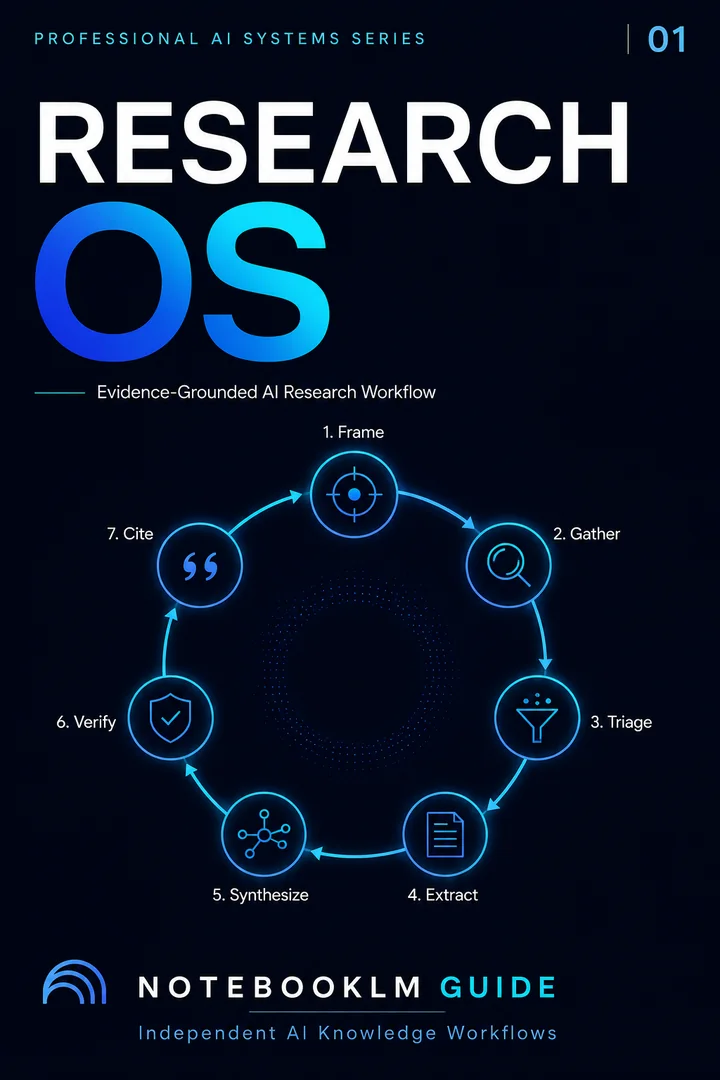
A complete research architecture—from source intake to durable knowledge reuse
Use a connected research system for reading, corpus management, literature review, deep research, grounded retrieval, communication, and long-term knowledge maintenance.
One-time payment · permanent digital access · no physical shipping · no recurring fee · updates through December 31, 2026 included
Contents
274 PromptsPart titles are top level. Research application modules are indented one level, with page numbers aligned at right. 274 numbered copy-and-paste prompts: 64 in the universal architecture plus seven modules of 30.
- Part 1: Product Overview and Philosophy3
- Part 2: The Universal Research Architecture (64 Prompts)5
- Part 3: Research Application Modules108
- Module 1 — Research Paper Reading (30 Prompts)109
- Module 2 — Source Architecture and Corpus Management (30 Prompts)176
- Module 3 — Literature Review and Synthesis (30 Prompts)239
- Module 4 — Deep Research and Evidence Discovery (30 Prompts)297
- Module 5 — Grounded Retrieval and RAG (30 Prompts)366
- Module 6 — Research Communication and Poster Handoff (30 Prompts)434
- Module 7 — Knowledge Persistence, Refresh, and Reuse (30 Prompts)503
The Research OS compresses a six-month literature review to about two weeks using five workflows: systematic review, deep reading, research-gap mapping, citation verification, and slide output. NotebookLM keeps every step grounded and cited, from initial search to a defense-ready presentation.
TL;DR — Compress a 6-month literature review to 2 weeks. 5 workflows covering systematic review, deep reading, research gaps, citation verification, and synthesis-to-presentation. NotebookLM + Claude + Gemini + ChatGPT. 1 free + 29 premium. Built for PhD students and serious researchers.
Updated June 2026. Maintained by a small team of AI super-users who teach multi-AI research and study workflows to researchers, students, and professionals — no affiliate relationships. About this guide →Changelog
Module 1 — Systematic Literature Review: PRISMA-compliant pipeline using 4 AIs. NotebookLM for ingestion, Claude for gap identification, ChatGPT for abstract screening, Gemini for data extraction. Module 2 — Deep Reading: Deconstruct 300-page theoretical works in 3 hours. Logic skeleton maps + argument vulnerability checklists. Module 3 — Research Gaps: Negative space analysis via Claude. Find what the literature does NOT cover. Module 4 — Citation Integrity: Triple-layer anti-hallucination verification. Zero fabricated references. Module 5 — Synthesis → Slides: Claude Deep Research → NotebookLM slide deck. From curiosity to keynote in under an hour.
Who becomes a 10× more productive researcher with this OS?
Select your stage — each links to the module most relevant to you
Compress Your Literature Review from 6 Months to 2 Weeks
PRISMA-compliant pipeline. 4 AIs screening 500+ abstracts, extracting data from tables, and identifying gaps — all auditable.
Deconstruct Foucault, Marx, or Heidegger in 3 Hours — Not 3 Months
Upload 300-page theoretical works. Extract logic skeleton maps and argument vulnerability checklists in one session.
Achieve 100% Citation Accuracy — Zero Fabricated References
Triple-layer verification: NotebookLM for grounding, Gemini for DOI checks, Claude for claim-to-source alignment.
Research Findings → Defense-Ready Slide Deck in Under an Hour
Claude Deep Research for synthesis → NotebookLM for slide generation → Pencil UI for revision → PPTX export.
Start with the Quick Start Guide
Set up your account, learn the 9 Studio tools, and copy your first prompt — all in under 10 minutes.
The Full Pipeline at a Glance
Five modules, four AI tools, one integrated workflow from literature search to slide deck
① Systematic Review
NLM + Claude + GPT + Gemini
② Deep Reading
Claude (200K) + Gemini (1M)
③ Research Gaps
Claude negative space analysis
④ Citation Check
NLM + Gemini + Claude triple-layer
⑤ Synthesis → Slides
Claude Deep Research → NLM Studio
| Research Phase | NotebookLM | Claude | Gemini | ChatGPT |
|---|---|---|---|---|
| Source ingestion & grounding | Primary — RAG + citations | Processes files | Processes files | Processes files |
| Abstract screening (500+) | Not batch-capable | Good at 200K | Good at 1M | Custom GPT batch |
| Gap identification | Grounded gap detection | Negative space analysis | Can identify | Can identify |
| Deep theoretical deconstruction | Good for Q&A | 200K logic mapping | 1M full-book context | 128K limit |
| Citation verification | Source-grounded (no hallucination) | Claim-to-source alignment | DOI verification via Scholar | High hallucination risk |
| Data extraction from tables | Data Tables feature | Good | Multimodal PDF analysis | Good |
| Synthesis → slide deck | Studio — one click + Pencil UI | Deep Research synthesis | Limited | Limited |
Module 1: How Do I Run a PRISMA-Compliant Systematic Review with AI?
A 6-month literature review compressed to 2 weeks. 4 AIs, each assigned to the phase where it excels.
Systematic reviews are the gold standard of evidence synthesis — the foundation of clinical guidelines, policy decisions, and meta-analyses. Yet they take 6 to 18 months, require reading 500+ abstracts, and carry high error rates from manual screening fatigue. A single missed paper can invalidate an entire review.
The Research OS assigns each AI to its optimal phase. NotebookLM ingests your full-text PDFs and produces source-grounded summaries with inline citations. Claude generates Boolean search strings and identifies methodological gaps across your corpus with its 200K-token context. ChatGPT batch-processes hundreds of abstracts against inclusion/exclusion criteria. Gemini extracts data from PDF tables and figures using multimodal analysis. The pipeline produces PRISMA-compliant documentation at every step.
Module 2: How Do I Deconstruct Dense Theoretical Works with AI?
Upload a 300-page Foucault or Heidegger text. Get logic skeleton maps and argument vulnerability checklists in one session.
A 300-page work by Foucault or Heidegger isn't 300 pages of linear argument. It's a labyrinth of nested claims — premises buried inside digressions, conclusions that depend on assumptions introduced 80 pages earlier, and critical terms that shift meaning between chapters. Even experienced scholars miss structural dependencies on first reading. A PhD student might spend 40–80 hours to truly "own" a single theoretical text.
Large-context AI changes the game. Upload the entire book into a 200K–1M token context window, and the AI holds the entire argument structure in working memory simultaneously. It doesn't read sequentially — it traces logical dependencies across hundreds of pages in seconds. This doesn't replace deep thinking. It accelerates the structural analysis so you can spend your time on what AI cannot do: original critique, creative interpretation, and theoretical innovation.
Module 3: How Do I Identify Original Research Gaps from My Literature?
Negative space analysis — find what the literature does NOT cover
Most researchers look for what their literature says. The breakthrough is looking for what it doesn't say. Negative space analysis uses Claude's reasoning to identify the boundaries of existing knowledge — the questions nobody has asked, the populations nobody has studied, the variables nobody has tested, and the contradictions nobody has reconciled.
NotebookLM provides the grounded evidence base. Upload your papers and let NotebookLM surface explicit "future research" recommendations, methodological limitations, and contradictory findings. Then hand this structured output to Claude, which reasons about what studies would need to predict, measure, and find to fill each gap — producing research opportunities that are both grounded and original. See also our Hypothesis Generation workflow to transform gaps into testable predictions.
Module 4: How Do I Verify AI-Generated Citations Aren't Hallucinated?
Triple-layer verification pipeline — because one fabricated reference can end a career
Large language models generate citations by pattern-matching, not by looking up real databases. They produce plausible combinations — a real author name + a real journal name + a plausible year — but the specific paper may never have existed. The DOI format is correct. The journal exists. But the paper is a ghost. These "almost-right" citations erode trust silently and can trigger retraction for citation fraud — even when unintentional.
The triple-layer protocol eliminates this risk. Layer 1: NotebookLM for source grounding — it only cites documents you uploaded, eliminating hallucination for grounded queries. Layer 2: Gemini for DOI verification against Google Scholar — real-time confirmation that a cited paper actually exists. Layer 3: Claude for claim-to-source alignment — verifying that a citation actually supports the claim it's attached to, not just that it exists. Together, these three layers achieve bulletproof citation accuracy before submission.
Module 5: How Do I Turn Research into a Presentation Deck?
Claude Deep Research for synthesis → NotebookLM for slide generation → PPTX export
Research is divergent — you want to explore widely and follow threads. Presentation is convergent — you need a single narrative. Most people try to do both simultaneously, and neither comes out well. The research is shallow because you're already thinking about layouts, and the deck is scattered because you haven't finished thinking.
Claude's Deep Research solves the first half — it conducts multi-step autonomous research, following chains of sources and producing a comprehensive synthesis with citations. NotebookLM solves the second half — upload the report as a source and NotebookLM restructures it into a slide deck with narrative arc, speaker notes, and visual direction, all grounded in what the research actually found. Revise with Pencil UI. Export as PPTX. From curiosity to keynote in under an hour.
1 Free Prompt — Systematic Gap Identification
Upload at least 5 research papers to NotebookLM before running this. The 29 premium prompts cover all 5 modules.
Teaser — Negative Space Gap Analysis
Research Gaps · Free① Systematic Review
🔒 29 prompts
② Deep Reading
🔒 29 prompts
③ Research Gaps
🔒 29 prompts
④ Citation Integrity
🔒 29 prompts
⑤ Synthesis → Slides
🔒 29 prompts
From literature search to slide deck — the complete AI-powered research pipeline that turns weeks into days
- End-to-end integration eliminates handoff losses. Search → read → analyze → synthesize → present. Each stage feeds the next, so no insights are lost in translation.
- Built for graduate students and faculty. The pipeline handles the specific workflow of academic research — not generic 'productivity' advice.
- Slide deck output closes the loop. Research that ends in a document gets read; research that ends in a presentation gets funded, published, and cited.
Full research pipeline unlocks below ↓
Frequently Asked Questions
What is the Research OS?
A complete AI-powered research pipeline covering 5 integrated workflows: systematic literature review (PRISMA-compliant), deep reading of theoretical works, research gap identification via negative space analysis, citation integrity verification, and synthesis-to-presentation deck building. It uses NotebookLM, Claude, Gemini, and ChatGPT — each assigned to the task where it genuinely excels.
How does this compress a 6-month literature review to 2 weeks?
By automating the high-volume mechanical work: ChatGPT screens 500+ abstracts against inclusion/exclusion criteria in hours (not weeks). Gemini extracts data from PDF tables and figures using multimodal analysis. NotebookLM produces source-grounded summaries with citations. Claude identifies gaps across the full corpus. You still make the analytical judgments — but the pipeline handles the throughput. See the Systematic Literature Review module.
How do I verify citations aren't hallucinated?
The triple-layer protocol: (1) NotebookLM only cites documents you uploaded — zero hallucination for grounded queries. (2) Gemini verifies DOIs against Google Scholar in real time. (3) Claude checks that each citation actually supports the claim it's attached to. See the Citation Integrity module.
Can AI really deconstruct Foucault or Heidegger?
It can perform the structural analysis in hours that takes PhD seminars a semester. Upload the full text into Claude (200K tokens) or Gemini (1M tokens), and the AI holds the entire argument in working memory — tracing logical dependencies across hundreds of pages. It produces logic skeleton maps and identifies vulnerabilities in the reasoning. It does not replace original critique or creative interpretation — that's still your job. See the Deep Reading module.
How do I turn research into a presentation?
Claude's Deep Research produces an exhaustive synthesis report. Import it into NotebookLM and use the Slide Deck Studio tool to generate a complete presentation with narrative arc, speaker notes, and AI visuals — grounded in your research. Revise individual slides with Pencil UI. Export as PPTX.
Is this suitable for master's students or only PhDs?
The systematic review and citation integrity modules are useful at any graduate level. The deep reading module is most relevant for theory-heavy disciplines (philosophy, critical theory, social sciences). The synthesis-to-slides module works for anyone presenting research. Start with the module that matches your current challenge.
What does the pipeline cost?
NotebookLM is free (50 sources per notebook). Claude free tier covers basic use; Claude Pro ($20/mo) for Deep Research. Gemini free tier is sufficient for verification; Pro ($24.99/mo) for extended use. ChatGPT free tier works for screening; Plus ($20/mo) for Custom GPTs. Total: $0–60/month depending on which tiers you need. See our Pricing & Limits guide.
Start here if research is your immediate bottleneck.
Research OS completely solves this focused job. The next constraint usually appears when you need to turn evidence into Studio outputs and content while preserving citations and constraints. That is the point Sovereign is designed for.
Single OS = depth in one domain. Sovereign = integration across Research, Studio, Content, and Multi-AI.
Already own Research OS? Contact help@notebooklm-guide.com for current Sovereign upgrade options before purchasing again. No automatic credit is promised on this page.