Before
One overloaded instruction
Every priority competed inside the same answer. The result was often competent, balanced, and strangely flat.
I did not need another AI that could write a polished answer. I needed help carrying the five jobs behind every serious project: research, creation, criticism, usability, and distribution. The free prompt below solved the thinking problem. The updated workflow solves what happened next.
TL;DR — The AI Round Table puts five specialist seats and one human chair in the same conversation so disagreement is visible before you act. The guide shares a free five-role prompt, shows how to ground evidence in NotebookLM, and expands it into a multi-AI workflow that needs human approval.
Page last updated July 30, 2026. Independent guide by NotebookLM Guide; no affiliation with Google.
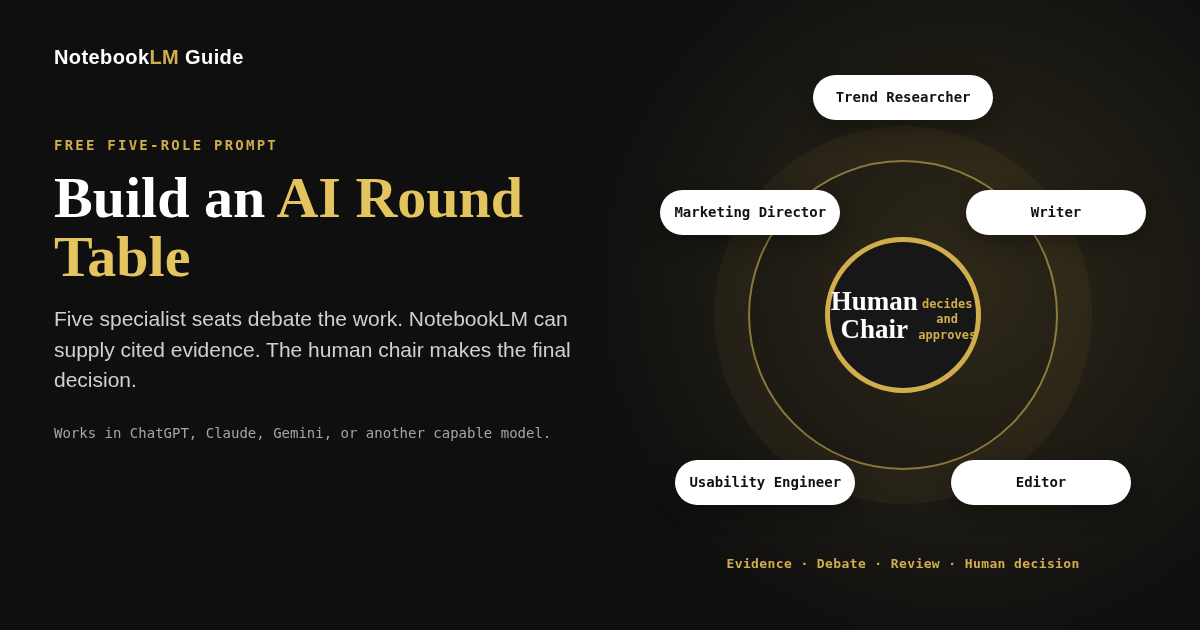
An AI Round Table gives several specialist roles separate responsibilities, requires them to expose disagreements, and assigns one chair to make the final recommendation. It can run in one model, across several AI tools, or through limited task execution agents. Human approval remains required for consequential actions.
Start with the free five-role prompt. Use NotebookLM when the Round Table needs cited evidence from a controlled source set. Add other AI tools or agents only when they remove a real coordination bottleneck.
For a long time, my workflow looked efficient from the outside. I could open one chat, describe a project, and get a respectable answer in seconds. But the answer was only the visible part of the work.
I was still the person who had to decide what to research, find the evidence, explain the audience, turn the research into a draft, edit the draft, check whether it was usable, think about distribution, and remember every unresolved question. When one tool finished, I copied the result into the next tool. When two answers conflicted, I quietly reconciled them myself.
The AI was producing faster. I was still coordinating everything.
That distinction matters because coordination is the work no productivity demo counts. It is the constant switching between roles. It is remembering why one source was trusted, which paragraph still needs evidence, whether the editor removed the important nuance, and whether the final page actually works after the writing is finished.
I stopped asking one assistant to be creative, analytical, concise, persuasive, critical, and practical at the same time. Real teams do not work that way. The researcher is not supposed to rewrite every sentence. The editor is not supposed to invent the marketing strategy. Clear boundaries make each perspective sharper.
So I built a five-seat content Round Table and forced the roles to speak separately before the chair made a decision.
You are the Chair of an AI Round Table. Create five specialists with narrow, non-overlapping responsibilities for the task below.

Default seats:
1. Trend Researcher — evidence, trends, audience questions, and opportunities. Does not write the final deliverable.
2. Writer — story, explanation, structure, and first draft. Does not perform SEO or final QA.
3. Editor — clarity, cuts, logic, and voice. Does not introduce unsupported new claims.
4. Usability Engineer — reader effort, pacing, navigation, comprehension, and friction. Does not rewrite the whole piece.
5. Marketing Director — positioning, title, hook, CTA, and distribution. Does not override factual accuracy.

Process:
Round 1: Each specialist gives an independent recommendation without seeing a manufactured consensus.
Round 2: Each specialist identifies one disagreement, missing assumption, or weakness in another recommendation.
Round 3: The Chair decides. Do not average every view into a vague compromise.

Final answer must include:
- the decision,
- the strongest reason,
- what changed because of the debate,
- evidence still needed,
- unresolved uncertainty,
- and the next action.

Task: [INSERT THE REAL TASK]
Context and sources: [INSERT THEM]
Audience and constraints: [INSERT THEM]
Desired output: [INSERT IT]
Every priority competed inside the same answer. The result was often competent, balanced, and strangely flat.
Each specialist protected one professional concern before the chair reconciled the conflict.
I could see why the editor wanted a cut, why the researcher resisted it, and what the marketing angle would cost in nuance.
The original prompt remains the right starting point for brainstorming, critique, planning, and one-time decisions. Most people do not need an autonomous agent team to improve a draft. They need sharper perspectives and a chair that refuses fake consensus.
The five voices could disagree convincingly. Underneath, they were still one model sharing one conversation. When the response ended, so did the “team.”
The update is not “add more agents.” It is a progression. Stop as soon as the workflow is good enough.
One capable model plays several tightly clearly limited roles. Use it when the problem is narrow thinking, weak critique, or premature consensus.
Different tools handle different kinds of work: source-grounded evidence, web discovery, synthesis, production, or independent review.
Agents with limited permissions inspect files, create artifacts, run checks, repeat tasks, or work in parallel. Consequential actions still wait for human approval.
| Existing problem | Updated response |
|---|---|
| AI agrees too quickly | Specialists form independent views before reading the others. |
| Every role blends into the same voice | Each specialist receives a narrow mission, exclusions, inputs, and a required artifact. |
| Research and writing contaminate each other | Evidence collection, interpretation, drafting, and review become separate stages. |
| The user copies material between tools | A chair defines compact handoffs and keeps the project state visible. |
| Nobody verifies the finished result | A separate reviewer or red-team pass checks claims, execution, and acceptance criteria. |
| Recurring work must be restarted manually | Defined checks can be scheduled when the platform supports recurring execution. |
| Autonomous changes create risk | Permissions, backups, retry limits, hooks, and approval gates bound the work. |
| Disagreements disappear into polished prose | The chair records unresolved conflict instead of hiding it inside a smooth answer. |
ChatGPT, Claude, Gemini, NotebookLM, Perplexity, and execution environments are examples—not mandatory seats. Use only the tools that create a meaningful difference in the work.
Use a tool such as NotebookLM when the Round Table must stay anchored to a controlled source set and show where claims came from.
Use a search-enabled model or research tool when the project needs current sources, competitor discovery, or questions the existing files cannot answer.
Use ChatGPT, Claude, Gemini, or another capable model to frame the decision, design briefs, reconcile conflicts, and produce the final recommendation.
Use another model, isolated conversation, or reviewer agent so the checker is not merely defending its own previous answer.
Use a coding, browser, or agent platform only when the project must operate on files, run tests, create artifacts, or repeat defined work.
The person defines the outcome, chooses acceptable risk, resolves value judgments, and approves consequential actions.
The AI Round Table guides the discussion and the decision. NotebookLM can supply the cited evidence. When the project must stay anchored to a defined collection of reports, transcripts, policies, papers, or internal documents, one seat should be responsible for protecting that source boundary.
That is why this guide belongs here. It does not replace the site’s product-specific tutorials. It shows what happens after NotebookLM has produced grounded findings: the Round Table decides who should interpret them, challenge them, turn them into an artifact, and approve the result.
It extracts supported findings, keeps citations attached, identifies conflicts between sources, and records what the evidence cannot yet establish.
It assigns interpretation, writing, implementation, and review to clearly limited roles—then returns the unresolved trade-offs to the human chair.
Load only the materials the Round Table is allowed to treat as evidence. Separate verified sources from inspiration, assumptions, and open-web discovery.
Ask NotebookLM for supported claims, exact source references, contradictions, and missing evidence—not a polished final recommendation.
Return the claims, citations, confidence level, source conflicts, and unresolved questions in a format another role can inspect quickly.
Pass the research summary with citations to the strategist, writer, or implementation role. Keep the evidence specialist from silently becoming the decision-maker.
A separate reviewer checks whether the final artifact still reflects the research summary with citations. The human chair approves publication, submission, or deployment.
Imagine maintaining a large educational website. A product changes. Dozens of pages may contain outdated claims. The obvious task is “update the article,” but the real project is much larger.
Someone must find every affected page, identify the claims that changed, locate current evidence, decide what should be rewritten, preserve the site’s voice, edit working files, validate links and structured data, inspect the mobile layout, and prepare a safe deployment.
With a normal chat workflow, AI can help with each step. But the human remains the go-between for all of them.
| Use one AI conversation when… | Use an AI Round Table when… |
|---|---|
| The task is short, reversible, and easy to inspect. | Several professional priorities genuinely conflict. |
| All work depends on the same small context. | Specialists need different sources, tools, or separate contexts. |
| The cost of coordination exceeds the benefit. | Independent work can run in parallel or needs independent review. |
| You need one coherent draft more than competing views. | The project must create several reviewable artifacts. |
| The human can verify the result immediately. | The workflow repeats often enough to justify a reusable system. |
Name the final artifact, acceptance criteria, sources, deadline, and actions that cannot happen automatically.
Choose the fewest specialist seats that create a real division of labor. Give every seat explicit exclusions.
Give each specialist only the files, sources, tools, permissions, and background it actually needs.
Parallelize research, extraction, alternatives, or tests that do not depend on one another. Keep true dependencies sequential.
Make specialists identify conflicting assumptions, missing evidence, and the cost of choosing one recommendation over another.
Use a separate reviewer to check claims, execution, omissions, edge cases, and the stated acceptance criteria.
The human chair selects the recommendation, records unresolved uncertainty, and writes a concise decision summary.
Publication, deletion, purchase, submission, deployment, and external communication remain blocked until a person approves them.
This prompt prevents the most common mistake: choosing a platform first and inventing work for it afterward.
Design the lightest controlled AI advisory-Round Table workflow that can complete the project below.

First decide whether this project needs:
A. one model with several roles,
B. several AI tools with structured handoffs,
C. or an agent tool that can complete clearly limited tasks.
Do not recommend a more complex level unless it removes a specific bottleneck.

Return:
1. The human problem the workflow is solving.
2. The smallest useful set of roles.
3. A role card for each specialist: mission, exclusions, inputs, allowed tools, prohibited actions, required artifact, verification method, stop condition, and escalation rule.
4. Which work is independent, which is sequential, and why.
5. The compact artifact passed between stages.
6. The chair's responsibilities.
7. The independent review gate.
8. Maximum retries and failure handling.
9. Actions requiring human approval.
10. A final acceptance checklist.

Project: [DESCRIBE THE PROJECT]
Available tools: [LIST THEM — OR SAY NONE]
Sources and files: [LIST THEM]
Sensitive or irreversible actions: [LIST THEM]
Final deliverable: [DEFINE IT]
This combination is useful when a project needs tool-assisted research plus parallel or scheduled execution. It is one possible setup, not the definition of the Round Table.
Use Gemini to translate the goal into role briefs, work with multimodal or web-connected inputs where appropriate, and reconcile the returned artifacts.
Explore the Gemini Orchestration Hub →Use projects, subagents, scheduled work, artifacts, and hooks when specialists must work on files or systems and return results for review.
Official Antigravity overview →Use a source-grounded workspace when the central risk is unsupported interpretation rather than execution.
Use NotebookLM as a research workspace →Researcher → Story Architect → Writer → Ruthless Editor → Audience Advocate → Chair.
Search Strategist → Source Analyst → Methods Auditor → Contrarian Reviewer → Synthesis Chair.
Customer Voice → Product Strategist → Technical Feasibility → Financial/Risk Reviewer → Devil's Advocate → Chair.
The goal is not maximum autonomy. It is less message carrying, less repetitive coordination, and more time for the decisions only a person should make.
The system can collect evidence and perform limited assigned work. It cannot decide what your audience deserves, what trade-off is acceptable, or whether a consequential action should happen.
Agentic means the human spends less time carrying information and more time exercising judgment.
Go deeper on debate, self-critique, chair design, and red-team protocols.
Explore Council of Agents →Route evidence, reasoning, production, and review to the tool that fits each job.
Explore Multi-AI Systems →Use NotebookLM to ground the Round Table in cited sources before adding more tools.
Explore the research workspace →This guide separates documented product capabilities from editorial workflow recommendations. Product-specific claims link to official documentation; the role design, handoff formats, review gates, and human-approval model are the publication’s recommended operating pattern.
Google’s official NotebookLM help explains source-grounded research and how sources are used in responses.
Official help →OpenAI documents Projects as workspaces for chats, files, instructions, and longer-running efforts.
Official help →Anthropic documents subagents with separate context, prompts, tool access, and permissions.
Official docs →Google documents subagents, scheduled tasks, artifacts, and hooks for limited task execution workflows.
Official overview →Google’s hooks reference explains how checks and custom scripts can run at defined execution points.
Official docs →It is a prompt that assigns several specialists narrow roles, requires independent recommendations and visible disagreement, and gives one chair responsibility for the final decision.
Yes. The prompt works in any capable model that can follow separate role instructions and a multi-round discussion.
No. A role prompt simulates several perspectives inside one conversation. An execution agent can have separate context, tools, permissions, tasks, artifacts, and execution state.
No. Add another tool only when it contributes a meaningful capability, such as grounded evidence, current web discovery, independent review, file execution, or recurring checks.
The older version solved one-dimensional feedback by creating five specialist perspectives. The updated version keeps that prompt and adds structured handoffs, tool routing, independent verification, optional execution, and human approval.
Use the fewest seats that produce a real division of labor. Four to six active seats is a useful default, but a smaller Round Table is often better for a narrow task.
Parallelize work that does not depend on another specialist's result, such as separate source reviews, alternative analyses, extraction from different files, or independent tests.
Use one agent when the task is short, reversible, easy to inspect, and based on one shared context. An AI Round Table adds value only when specialization, isolation, parallel work, or independent review outweighs the coordination cost.
They are one possible setup. Gemini can lead the discussion and combine the findings, while Antigravity can carry out assigned tasks through projects, subagents, artifacts, scheduled work, and hooks. Other tool combinations can follow the same Round Table process.
Load the approved source set into NotebookLM, extract supported findings with citations, record conflicts and evidence gaps, and pass a concise research summary to the strategy, writing, or review seats. The Round Table coordinates the next steps while the human retains approval.
Use least-privilege access, isolated working copies, backups or version control, source requirements, retry limits, independent review, preserved artifacts, and human approval before publication, deletion, purchase, submission, deployment, or external communication.
Start with the free research kit, or use the Multi-AI Systems templates when you need reusable handoffs, review gates, and approval checklists.
Learn what to upload, what to de-identify, and when sensitive work requires an approved organizational environment.